|
GTBank has recognized for its strength in innovative banking. The bank invests a lot in the appropriate technology to continually come out with innovative means of providing convenient banking solutions for its customers wherever they find themselves. GTWorld is the latest of such innovative solutions.
 Guaranty Trust Bank has launched a new Internet banking app called GTWorld, it's a mobile application that brings all the transactions at your fingertips in a new science fiction style.  The new platform is set to displace the former mobile app because I see a lot of potentials with it, especially the fascinating options of login patterns such as biometric (fingerprint and facial recognition), PIN, token and password options. With GTWorld, you have a Mobile Banking App that is designed to cater to all that's important to you easily and seamlessly. The facial recognition feature means that you now have a mobile banking App that recognizes you and adapts to how and when you want to bank. Key Features
At first login, you will be asked to authorize your mobile device to access the app. If this is your preferred device, please select 'Yes' and choose if you would like to create a 4-digit PIN for your banking transactions. If you choose to create a 4-digit PIN, you will be required to agree with the Terms of Use. A 6-digit secure code will be sent to your registered email address to verify your device. If you do not receive this message please generate a code from your hardware token or dial *737*7# from your registered phone number to obtain a one-time verification code. You can also call GTConnect on 08039003900 or 08029002900 for the verification code. Enter this code in the app and your mobile phone will be successfully verified against your account profile. Now you can start using the App. Please note that this is required only when using a device for the first time. If you chose to use the token as your preferred means of verifying your transactions, you will also be sent the 6-digit secure code via your registered email to verify your device for the first time. Enter this code and your mobile phone will be successfully verified against your account profile. You will then be able to start using the GTWorld with your hardware or 737 Token. Please note that you will be asked to select a preferred option for login and completing your transactions, from which you have the options of Password, PIN, Token, Fingerprint and Facial Recognition. You can always change your preference in settings.  The GTWorld mobile app downloading links were posted in all of the GTBank official social media: GTBank Google+, Facebook Page, and Twitter. We also contacted the bank and here is their reply "Hi, thank you for chatting with us. Please be informed that the GTWorld is an advanced option to our mobile banking app and has more features." So it's genuine, safe and official from GTBank. |
Showing posts with label Mobile. Show all posts
Showing posts with label Mobile. Show all posts
Monday, 29 May 2017
Download The New GTBank Advanced Mobile Banking Application — GTWorld

Wednesday, 6 July 2016
How to Send PDF, APK, ZIP or any other File in Whatsapp
How to Send PDF, APK, ZIP or any other File in Whatsapp

I have had many posts about Whatsapp in this blog till now. Whatsapp is the most popular messaging application in android as we already know. So i prefer writing more about Whatsapp because people are very interested about such topics. Even though whatsapp is the most popular messaging app, it has got some limitations. It’s quite natural because everything in this world is not perfect.
Some Limitations of Whatsapp Messenger
- We cannot send large files through Whatsapp, it holds only 16MB of file.
- We cannot send pdf files through whatsapp and it’s the most important document format.
- We cannot send APK files through whatsapp
- The quality of the image files we send through whatsapp is reduced by the server.
Today i’m here with a new post, that is how you can send pdf, apk, zip or any other files with any extension in whatsapp. This method can also be used to send large files upto 1 GB through whatsapp or any other instant messaging application you’ve got in your smart phone.
As i have told earlier whatsapp did not have any inbuilt feature to send this kind of files and we are going to depend an awesome android application that will definitely help us to send any files up to 1GB through Whatsapp.

WhatsTools is the application we are going to use for this purpose.The main advantage of this app is that, the recipient is not required to install WhatsTools to receive the file. Anyone on Whatsapp can receive and download the file with ease.
Actually this app works with the help of cloud storage like Google Drive. The file which we want to share on whatsapp are actually uploaded to our Google Drive Storage so that no one else can have access to it. This file, which we uploaded to our Google Drive are being shared to Whatsapp with the help of WhatsTools Service. This adds more security to the service since it is incorporated with Google Cloud.
WhatsTools has got 4.6 rating in Play Store and you can guess the popularity of the app.
How to Send PDF, APK, ZIP or any other Files in Whatsapp
I’ll show you the working procedure to operate WhatsTools. Follow the steps and also the screenshots to get a better understanding of the process.- First install WhatsTools from Google Play Store or Download it directly from the link given below.
- After installation, open the application then it will prompt you to enable background services for the app.
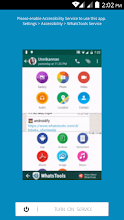
- Click OK to continue and enable WhatsTools Service.

- You will be redirected to the application. now click on the + Icon in the WhatsTools app and choose your favorite file to share.

- After choosing the file it’ll be uploaded soon.

- Click on ‘Share’ after the file has been uploaded. Then you’ll be prompted to choose the method to share the file.
- Choose Whatsapp Messenger from the list

- Select your favourite Whatsapp contact or group to share the file.
- Yes, you have done it right. Now people can download the files you have just sent.
- Now continue sharing as much as files you need without losing its clarity and perfection.
Features of WhatsTools: Share File Via IM
►Highlights◄☆ Via WhatsApp: Click on Attach button in chat window to show Whats Tools share menu. Click on the received message to open Download file popup.(We need your permission to show our menu on the click of attach button using an accessibility service)
☆ Any File Type: Share any type of file Archives, Docs, EBooks, Music, Images, Gif Videos of up to 1 GB via any Instant messaging app installed in your phone.
☆ Up To 1GB: Many of the IM’s have restriction on size of file sending (16MB) whereas WhatsTools allows you to send files of up to 1 GB to any of your instant messaging app’s contact.
☆ Pausing/Resuming: Uploading and downloading can be paused as well as resumed. In case of a network failure, you will be able to resume the upload/download without losing the current progress.
☆ Preview video before downloading: Thumbnails of video at different durations can be previewed before downloading the actual video which will help you decide whether to download the video.
☆ Cross-Platform: Send file to IPhone, Windows Phone & Blackberry. If the receiver is on another platform, the link will be opened in the browser and the user can download file from the webpage.
☆ Share to Anywhere: File sharing is not limited to SMS or IM’s. You can copy the download link and share it anywhere through SMS, Email or Social Media Platforms. Anyone with the link can download the file from any platform using a browser.
☆ Peace of mind: All data is guarded behind HTTPS/SSL encryption. We connect to your Google Drive™ with your permission to transfer your files. You can view & manage these files from your Google™ drive as well.
☆ Inbuilt Media Support: WhatsTools support playing of GIF and Music files within the app itself. The app has inbuilt Video player as well for common video formats.
►Initial Setup◄
1. Enable Accessibility Service.
2. Connect to your Google™ Drive.
3. That’s it. Start sharing files.
Tuesday, 5 July 2016
Earn Real Money Using Champcash [The Exclusive Guide]
Earn Real Money Using Champcash [The Exclusive Guide]

This post is dedicated to those people who really want to earn some bucks through their mobile phone with zero investment. Champcash is a mobile application that will help you to earn money from home without any risk.
First of all, let me say that this application is 100% legal and you can withdraw earned money directly through paypal or your bank account and you can also recharge your mobile phone.
Do you want to pay your own mobile bills, hostel bills etc? Then, this app is for you…. Earn pocket-money for yourself by installing and using this app. Read the section below right from the beginning to end to get an idea about what is champcash and how does it works?
What is Champcash?
Champcash is an Android application through which anyone can be a millionaire by just installing some apps in your Mobile. You need to just refer Champcash to your Friends and ask them to complete the challenge by installing 8-10 apps in their android phone, You will get its payment instantly. As networking is the best way to do any business, because through networking anyone can earn unlimited. We have also implemented networking in our system too. You can Earn upto 7 Levels in Champcash.Features of Champcash
- Earn Upto 7 Levels With Our Networking System.
- Champcash is 100% Free to Use, No hidden Charges includes.
- Just Refer Champcash to your friends and You can be Millionaire.
- Withdraw Earned Money Directly in Your Paypal / Bank Account.
- You can Recharge Any Mobile Number Internationally with Earned Amount.
- First Networking System in which You Can Make Network Internationally.
Benefits of Joining With Champcash
- Earn Millions by just installing some apps.
- Redeem Your Earned Money Via Paypal,Mobile Recharge and E-Gift Cards.
- You can do Mobile recharge of any Country
- Our system is 100% Free to use.
- Refer your Friends and Start Earning Immediately
How to Earn Unlimited Money by Using Champcash?
During Signup Use our Champcash Refer ID – 4723832 to get 1$Get Started with Champcash App
1) Download Champcash app from here2) Install the app
3) Open the app and sign up for new account by clicking on “Sign Up with Champcash”
4) Fill the required details name,passwords etc carefully
5) On the next page you will be asked to enter sponsor ID

6) Enter our ID to get $1 : 4723832 [You can’t access the app without entering the referral/Sponsor ID,use our ID “4723832 ”]
7) Now Accept the Challenge

8) Install the offer apps one by one to complete the challenge and to be a part of Champcash Network
System.
The best part: You have to do it only once in your life time.

9) Install all apps and complete your challenge and become part of Champcash Network.
10) After installing each app, open the app for at least one minute and then re-open champcash app
Don’t uninstall the apps after installation until your challenge is completed.
Use different browser if you got any error message like “Your browser is not supported”
After completing the challenge you will get sms and email saying
“Congratulations For Being Part of Our Network system. Now You are Eligible To Earn Unlimited with Us”
How Can you Earn Money with Champcash App?
Now that you have been a part of Champcash Network System.It’s time to make money. To make money using Champcash you need to refer your friends by either sharing your referral or your refer ID so that you will get money for each app install. Follow the below steps;- First you have to complete your own challenge to earn unlimited money with champcash app as already mentioned above
- After that, Click on “Invite and Earn” and start referring your friends
- Ask your friend to Complete the challenge
- You will get instant reward when your friend complete the challenge
- The More you refer the more you will earn
- You will get payment within 35 minutes of completing the challenge.
Minimum Redmeptions
Mobile Recharge : Rs 10Flipkart Gift Card : Rs 500
Bank transfer : $ 10
Payment Proof From Champcash
Bank Payment


How Much Referral Commission?
First you have to complete your challenge to earn unlimited money with champcash app as mentioned above
Trick To Earn unlimited Money with Champcash
This is a simple trick which we had shared earlier to earn unlimited money using champcash.To use this trick you need Bluestack and BS Tweaker.
Download these two software from our one drive link Bluestack + BS Tweaker
- Change Your Bluestack Id using BS Tweaker each time for New installs.
- Install Champcash.
- Now Enter any Mobile no. [you can chose any random mobile no. you don’t have to verify it].
- Enter other Info like address, Name etc.
- Enter Your Referral Code.
- Complete tasks form the app [Download the apps as above] and Get 1$ in your account and Referral Credits would be received in your account within 35 minutes.
Repeat The Process to Get unlimited Referral Bonuses. You can opt for transfer these credits into your account when you earn $10 in your Champcash account.
How to Enable Whatsapp chat heads using Dashdow App?
How to Enable Whatsapp chat heads using Dashdow App?
We can enable whatsapp chat heads in our android phone using Dashdow application which is a free app that is available in Google play store. I have searched for many apps that allow this functionality and finally found out Dashdow app which is quite good for the job.The important advantage of this app is that it doesn’t require root permissions to enable whatsapp chat heads like all other apps. Follow the step by step tutorial below and enable chat heads for your whatsapp messenger with in no time.

- After Installing the above application in your Phone, Let’s Open it, and you will see some Options in this app.
- Simply Select the First Option, which is Notification Access.

- After clicking on Notification Access option, it will redirect you to Settings, and Tick on Dashdow app icon, and Press Back Button of your Phone.

- Now you are done !! no need to do any other Settings. Simply Enjoy your Phone, if any Whatsapp SMS comes, then this application will give you a Pop up, like Below Screenshot.

So this was the easy guide for setting up the Dashdow app in your Android Phone, to Enable Whatsapp Chat heads. Enjoy whatsapp just like Facebook Messenger with this awesome application installed on your phone.
How to Change Whatsapp Theme – Yes You Can! [2016]
How to Change Whatsapp Theme – Yes You Can! [2016]
You might have searched many times in search engines like ‘how to change whatsapp theme, download whatsapp themes, change default whatsapp theme
etc. You need to know one thing, that is whatsapp has only a single
theme, the green one as we are already seeing when we open whatsapp.
Now you might be asking, ‘Then how could i change the whatsapp theme?

What we are gonna do is that, we will be installing an alternate application to whatsapp called GB Whatsapp. You might have heard about it, but before you close this page without reading further, atleast read the features of GB Whatsapp and you will know why i insist you to install this awesome application.
Features of GB Whatsapp Messenger
It is an alternative version of the WhatsApp Messenger and to run the second account and supports all android devices in addition to other features which are listed below.
Features
Privacy options
- Hide Online Status
- Hide Blue ticks
- Hide Second tick etc
- Anti ban and lock with password
- End to end encryption
- Make characters bold and italic
- Possibility to distinguish between collective messages and regular
- Possibility of a lock for Whatsapp with password
- The ability to send video size of 80 MB instead of 16 MB
- The possibility of sending 90 image at once without 10
- Possibility of a case of the number of dependent characters 250 instead of 139 symbols
- Counter statistics for groups
- View the media without loading
- The possibility to hide the name and the date when copying two or more
- Ability to copy case
- The possibility of changing the program format, and change the program icon and notices
- and many more feature
How to Change Whatsapp Theme ?
I will be explaining the detailed steps to change the default whatsapp theme on android using GB Whatsapp. For that follow the steps below;- Uninstall the original Whatsapp Messenger.
- Now download the latest version of GB Whatsapp from the link below.
- After downloading the apk, install it on your android device.
- Now that you have installed GB Whatsapp on your phone, Open the application.
- Enter your Name & Verify your account as you are doing it in the original Whatsapp messenger.
- Now you ‘ll get an interface like the one below.
- Access the Menu of GB Whatsapp by clicking the menu button of your phone. See below

- Click on GB Settings -> Download Themes

- Wait for the themes to load. Now you see a list of themes as shown below.
- Select & Download your favorite theme from the list.

- Restart the application to activate theme.
- That’s it you have successfully changed the whatsapp theme.
- GB Whatsapp not only allows you to change the default whatsapp theme but it has many other features.
How to make your text bold & italic in whatsapp?
To make your text more stylish, follow the below guidelines.• Bold: Add an asterisk (*) before and after the specific words or phrases you want to embolden e.g. *hello*
• Italics: Add an underscore (_) before and after your chosen words or phrases e.g. _hello_
• Strikethrough: Add a tilde (~) before and after the words or phrases you want to strike a line through e.g. ~hello~
How to see who is online now in whatsapp?
Open GB Whatsapp.Access Menu and click on GB Settings
Select Main/Chats Screen
You will see an option called Contact Online Toast.
Enable the option to get notification about who is online. It will give you sound notification whenever someone in your contact list comes online.
How to hide online status in whatsapp

Touch the menu button in GB Whatsapp and Choose Privacy -> Hide Online Status -> Hide for Contacts
This way you can hide your online status even if you are online in whatsapp.
How to hide blue ticks in whatsapp

Touch the menu button in GB Whatsapp and Choose Privacy -> Blue Ticks -> Hide for Contacts
Through hiding blue ticks your receipient will not see blue ticks even if you read the message, they will not see the second tick also through this option.
Note: Please do not use the Hide Second Tick option because you will no longer receive messages if you hide that option.
How to hide writing status in whatsapp
Touch the menu button in GB Whatsapp and Choose Privacy -> Writing Status -> Hide for ContactsNow your contacts will not see the Typing… status while you type any text.
There are many other privacy options available in GB Whatsapp which you can check after installation.
How to see who is online now in whatsapp
To see who all people are now online in whatsapp, enable the option called Contact Online Toast.You can enable it by going to Menu -> GB Settings -> Main/Chats Screen -> Contact Online Toast -> Show Contact Online
There are many other options available other than the main advantages listed above. You can check for yourself by downloading and installing the app. I have been using this app for 1 month now and it’s really awesome. There are many other prank apps available in the name of whatsapp. Please use the app that has provided above and do not use any other fake apps. source: lollipopguide.com
Friday, 1 July 2016
Twitter Tries to Get Stickier
Twitter Tries to Get Stickier

Twitter fans who want to dress up pix they post to the service can do it with #Stickers, a new feature announced Monday.
"Soon, you can browse our rotating sets of stickers to join in on real-time conversations, and select from the library of hundreds of accessories, emoji, and props to make your photos more fun," said Sasank Reddy, a senior product manager at Twitter.

"Use them to share what you're doing or how you're feeling, to show support for a cause, or to just add some flair. You can use multiple stickers on a photo, resize and rotate them and place them anywhere on your picture," Reddy said.
What's more, after tweeting a photo with stickers, the pic becomes searchable in a new way. Tapping the sticker will take you to a new timeline where you can see how people all over the world have used the sticker.

#Stickers will be rolling out for iOS and Android "over the next few weeks," Reddy noted.
Youth Magnet
By introducing stickers to its service, Twitter is joining a number of other apps that have embraced the cartoon as a form of embellishment.
"The target market is likely mostly younger people who have become accustomed to using stickers and filters in messaging apps and will appreciate them being present in Twitter too," said Jan Dawson, chief analyst with Jackdaw Research.
"They're certainly very popular in major Asian messaging apps," he told TechNewsWorld. "LINE makes about a quarter of its revenue from selling stickers and similar products to users of its messaging apps."
LINE, which is very popular in Japan, is an app for instant communication of text, images, video and audio, as well as transmission of VoIP calls and video conferences.
"LINE is the No. 5 top grossing app in our top 52 app ranking," noted Ross Rubin, senior director for industry analysis at App Annie.
Franchise Potential
LINE has been able to spin off merchandise lines based on sticker characters and even open a chain of retail stores in South Korea, China and Japan for sticker-inspired products, according to Rubin.
"Stickers have the potential to become a tremendous franchise," he said. "They can be a revenue opportunity for Twitter."
In addition to stickers, Twitter offers a number of other photo-editing features such as filters, tags, cropping, and adding descriptions to images.
"Filters and other similar features are also very popular on Snapchat, but Twitter seems to have a unique spin here," Jackdaw's Dawson said.
"Making stickers on other people's pictures clickable and searchable is a likely way to make the feature more discoverable, but stickers are in some ways a poor fit with how Twitter is used by many people, which is more about public interactions than private sharing," he explained.
Mona Lisa's Mustache
Adding features found on other platforms isn't likely to diminish the unique appeal of Twitter, said AppAnnie's Rubin. "Just because it supports stickers doesn't detract from its differentiation as this real-time feed of what's happening in people's lives and around the world." In fact, adding stickers to the Twitter portfolio could help engagement at the service, he suggested.
"Stickers have had a positive impact on many of the other apps that have adopted it," Rubin pointed out.
Although adding stickers to an image strikes some photographers as akin to painting a mustache on the Mona Lisa, others have a more positive view.
"A lot of serious photographers adopt some of these new technologies as a different kind of art form," said David D. Busch, creative director of the David Busch Photography Guides.
"It's similar to creating collages and extreme PhotoShop processing," he told TechNewsWorld. "I can see some serious photographers taking advantage of this to create a new form of art, but it will be most widely used by consumers."
Tuesday, 7 June 2016
Mitsubishi Outlander Car's Theft Alarm Hacked through Wi-Fi
Mitsubishi Outlander Car's Theft Alarm Hacked through Wi-Fi

It is not new for security researchers to hack connected cars. Latest in the series of hackable connected cars is the Mitsubishi Outlander plug-in hybrid electric vehicle (PHEV).
A security expert has discovered vulnerabilities in the Mitsubishi Outlander's Wi-Fi console that could allow hackers to access the vehicle remotely and turn off car alarms before potentially stealing it.
The company has embedded the WiFi module inside the car so that its users can connect with their Mitsubishi mobile app to this WiFi and send commands to the car.
A security expert has discovered vulnerabilities in the Mitsubishi Outlander's Wi-Fi console that could allow hackers to access the vehicle remotely and turn off car alarms before potentially stealing it.
The company has embedded the WiFi module inside the car so that its users can connect with their Mitsubishi mobile app to this WiFi and send commands to the car.
Researchers from security penetration testing firm Pen Test Partners discovered that the Mitsubishi Outlander uses a weak WiFi access security key to communicates with the driver’s phone.
The key to getting into the Wi-Fi can be cracked through a brute force attack (“on a 4 x GPU cracking rig at less than four days”), according to researchers. In fact, "a much faster crack could be achieved with a cloud hosted service, or by buying more GPUs."
The key to getting into the Wi-Fi can be cracked through a brute force attack (“on a 4 x GPU cracking rig at less than four days”), according to researchers. In fact, "a much faster crack could be achieved with a cloud hosted service, or by buying more GPUs."
Once cracked, the researchers captured the handshake or connection process between the driver's phone and the car.
The researchers then used a man-in-the-middle (MitM) attack between a driver's home WiFi network and the car's access module to spy on the data flowing between the Mitsubishi app and the car, and compromise the car's system.
The researchers were then able to mess with the air conditioning system, turn lights on/off, push the car to charge on premium-rate electricity, change the car’s charging settings, drain the battery, and most disturbing, break into the car and turn the car's anti-theft alarm off.
The researchers then used a man-in-the-middle (MitM) attack between a driver's home WiFi network and the car's access module to spy on the data flowing between the Mitsubishi app and the car, and compromise the car's system.
The researchers were then able to mess with the air conditioning system, turn lights on/off, push the car to charge on premium-rate electricity, change the car’s charging settings, drain the battery, and most disturbing, break into the car and turn the car's anti-theft alarm off.
Another issue with the vehicle is that the name of each Outlander's Wi-Fi network is distinctive.
A short-term fix for car owners is to unpair all devices from their vehicle's WiFi module. For this, go to the app's "Settings" and select the "Cancel VIN Registration" option.
Once all paired devices are unpaired, the car's Wi-Fi module will effectively go to sleep.
Mitsubishi responded to the issue by saying that "this hacking is a first for us as no other has been reported anywhere else in the world," and that it is working with Pen Test Partners to fix the issues permanently.
"Some were spotted while driving and others when parked at their owner's house," security researcher Ken Munro said. "A thief or hacker can therefore easily locate a car that is of interest to them."Since the company has sold more than 100,000 Mitsubishi Outlander PHEV worldwide, the hack would not be a great news for its users.
A short-term fix for car owners is to unpair all devices from their vehicle's WiFi module. For this, go to the app's "Settings" and select the "Cancel VIN Registration" option.
Once all paired devices are unpaired, the car's Wi-Fi module will effectively go to sleep.
Mitsubishi responded to the issue by saying that "this hacking is a first for us as no other has been reported anywhere else in the world," and that it is working with Pen Test Partners to fix the issues permanently.
Thursday, 2 June 2016
No Man's Sky: Life After Launch
No Man's Sky: Life After Launch

Persistence. It's what permeates the fabric of upcoming sci-fi odyssey No Man's Sky, and it's what will see the game well past its launch this summer.
While eager to set out into a digital space that's populated with 18,446,744,073,709,551,616 unique planets, gamers have, for the most part, expressed patience as the handful of developers at Hello Games marched toward the release of what may be the most ambitious game to date.
Of course, expectant fans were disappointed by last week's confirmation of a rumor that the launch would be postponed from June to August, but some gamers reportedly were so angry they leveled death threats -- not only against the bearer of the sad tidings, but also against Hello Games Managing Director Sean Murray.
I have received loads of death threats this week, but don't worry, Hello Games now looks like the house from Home Alone#pillowfort

Video game launch delays are nothing new, so perhaps the insane reaction speaks to the intensity of anticipation for No Man's Sky.
Planetary Evolution
Hello Games has no downloadable content planned for No Man's Sky, but it intends to update the super-massive space from time to time. With Murray anticipating that players will only explore 0.1 percent of No Man's Sky over the life of the game, post-release DLC doesn't appear to be necessary.
Despite 99.9 percent of the No Man's Sky universe potentially going unseen, that big and open universe will continue to evolve through the game's existing code and updates to it.
The delivery of improvements will depend on how many boxes the game checks off on fans' wish lists, according to Mike Schramm, head of the qualitative analyst team at EEDAR.
"There hasn't been anything announced post-release yet, but if the game does live up to its high expectations, it's hard to think that there couldn't be some sort of follow-up content, like new ships for players to buy or new additions to the procedural engines powering the game," he told TechNewsWorld.
A Limit on the Sky
When gamers on PS4s and PCs blast off, they'll have three angles from which to attack the roughly 18 quintillion planets.
Players can participate in the pilgrimage to the center of the universe, pillage planets while ducking interplanetary police, or build bases and trade goods. All that is a ton of promise coming from a studio that has just over a dozen employees.
As ambitious as No Man's Sky is, it doesn't instill excitement in everyone, according to George T. Chronis, director of qualitative analysis at DFC Intelligence.
The prevailing view surrounding the game is one of cautious optimism, he suggested.
"It's a huge universe to play in that adapts to player decisions, so No Man's Sky has the potential of having a really long tail where gameplay is concerned," Chronis told TechNewsWorld. "If word of mouth is favorable, the game could have a steady build of new users over time."
There are three main ways to play the game, but the story line is left up to the players.
With its lack of a "clear, centralized narrative," No Man's Sky will have to find a way to resonate with players at a time when story-driven games such as Uncharted 4 are popular, said Joost van Dreunen, CEO ofSuperData Research.
Then there's the issue of pricing.
"At a (US)$60 price point, it may, at least at first, meet a degree of skepticism in the larger consumer market," van Dreunen told TechNewsWorld. "In its gameplay, it looks comparable to Ark: Survival Evolved or Rust, but those have a much lower price point."
The game also will have to contend with Steam's upcoming summer sale.
Known for its deep discounts on PC games, the summer sale will offer gamers the opportunity to select several critically acclaimed games, from hundreds, for less than the full-price fee Hello Games will charge for No Man's Sky.
"No Man's Sky is an ambitious project by Sony and has been in development for a long time," said van Dreunen. "I'm curious to see how a combination with the PSVR may affect its success."
VR, PSVR
It would be nice, after falling in love with a planet, to have the ability to revisit that world through the lens of virtual reality, Hello Games' Murray said in an interview with IGN last month.
VR literally would add another dimension to a game that many players in the mainstream already may feel is overwhelming in scale. Going by Murray's remarks, it's something that could roll out in one of the postlaunch updates later on in the game's life.
For now, Hello Games likely is looking at the feasibility of retrofitting the game with support for VR headsets such as PlayStation VR and the Oculus Rift, according to Patrick Walker, VP of insights and analytics at EEDAR.
"Implementing VR support into a first-person shooter title is technically challenging compared to other genres, which is why most of the VR ports released thus far have been isometric games like Defense Grid 2 and AirMech," he told TechNewsWorld.
With Sony backing Hello Games to push No Man's Sky, VR support would offer both companies a strategic advantage in tackling their respective goals with the game, according to Walker.
The fall release of the PlayStation VR headset gives Sony incentive to push for support for VR. That would get more mileage out of the game, and the additional sales would help Hello Games.
"This would give Sony an additional flagship title for the PSVR. By osmosis, this would be good for the VR industry in general as it would provide an example of a AAA title with VR support at a time when many are questioning the overall quality and breadth of the available content," said Walker.
Stardate: August 9
No Man's Sky will launch on PC and PlayStation 4 on August 9. No Xbox One release has been announced, though Microsoft has been working to change that.
"Hello Games has done a pretty good job of showing what's possible with the title," EEDAR's Schramm said, "and we're excited to hear what reviewers and players have to finally say about the finished game."
Friday, 20 May 2016
Facebook Sued for illegally Scanning Users' Private Messages
Facebook Sued for illegally Scanning Users' Private Messages

Facebook is facing a class-action lawsuit in Northern California over allegations that the company systematically scans its users' private messages on the social network without their consent and makes the profit by sharing the data with advertisers and marketers.
According to the lawsuit filing, Facebook might have violated federal privacy laws by scanning users' private messages.
Facebook routinely scans the URLs within users' private messages for several purposes like anti-malware protection and industry-standard searches for child pornography, but it has been claimed that the company is also using this data for advertising and other user-targeting services.
The plaintiffs, Matthew Campbell, and Michael Hurley argue that the Facebook is scanning and collecting URLs-related data in a searchable form, violating both the Electronic Communications Privacy Act and California Invasion of Privacy Act, reported the Verge.
Facebook argues that the company scans users' private messages in bulk, and maintains the URL records in an anonymized way, which is only used in aggregate form.
However, according to a technical analysis done on behalf of the plaintiffs, each URL-related message is stored in "Titan," a private message database that displays the date and time the message was sent, along with the user IDs of both the sender and the recipient.
However, it turns out that Facebook used this practice in past, but the company claimed to have stopped such practices a long time ago.
"We agree with the court's finding that the alleged conduct did not result in any actual harm and that it would be inappropriate to allow plaintiffs to seek damages on a class-wide basis," a Facebook spokesperson told CNET.
"The remaining claims relate to historical practices that are entirely lawful, and we look forward to resolving those claims on the merits."However according to the plaintiffs, Facebook is still continuing to collect links from users' private messages.
"Facebook's source code not only reveals that Facebook continues to acquire URL content from private messages, but that it also continues to make use of the content it acquires."Meanwhile, you can check out the lawsuit here. The lawsuit was originally filed in 2012 and for now, the case is expected to proceed.
Plaintiffs have until June 8 to file an amended complaint, following a scheduled conference toward the end of the month.
Subscribe to:
Posts (Atom)